The challenges are real. AI agent creation previously demanded extensive coding expertise, but 2026 has altered the map dramatically. The AI agent market will reach $52.62 billion by 2030. This growth creates enormous opportunities for businesses that can implement this technology effectively.
What makes an AI agent tick? The core concept is simple - it's a software entity that sees its environment, makes decisions, and acts on specific goals without human input. Modern platforms let us build these powerful tools without coding knowledge.
This piece from 2026 offers a straightforward, step-by-step process to build your AI agent on a reliable platform. Business owners seeking operational automation and tech enthusiasts exploring AI capabilities will find quick, actionable results here.
Why No-Code AI Agents Are Gaining Popularity
AI development has come a long way since its early days. Today, you don't need to be a specialized developer or data scientist to create AI agents. By 2026, state-of-the-art no-code platforms will make sophisticated AI agent creation available to almost anyone.
- The change from traditional coding to no-code tools
Building
AI agents used to need extensive coding knowledge, specialized teams, and big budgets. Many businesses found it hard to implement AI solutions because of these barriers. No-code platforms now give more people access to this powerful technology.
No-code AI agent development offers clear benefits:
- Dramatically reduced development time and costs
- Organizations save up to 80% in software development costs
- Building an agent takes just 15-60 minutes on most platforms
- Development cycles become up to 75% faster
No-code platforms give users the ability to build applications without writing code. They use user-friendly visual interfaces and drag-and-drop tools instead. Business teams, subject matter experts, and citizen developers who understand business problems best can now create AI agents.
On top of that, these platforms let teams test ideas quickly. As one source notes, "No-code is perfect if you want to launch your idea quickly without a big budget". Companies can now test concepts before spending too much money.
Traditional Coding vs. No-Code AI Development
| Aspect |
Traditional Coding |
No-Code Platforms |
| Required Skills |
Programming expertise |
Basic digital literacy |
| Development Time |
Months |
Days or hours |
| Cost |
High (specialized talent) |
Substantially lower |
| Flexibility |
High but complex |
Simpler but improving |
| Accessibility |
Limited to technical teams |
Available to all departments |
- How AI agent software is evolving in 2026
AI agents have grown at an incredible pace. Industry reports show the AI agent market crossed $7.60 billion in 2025 and will likely exceed $50 billion by 2030. These numbers reflect major changes in these tools' capabilities.
AI agents in 2026 do much more than simple
chatbots. Forbes puts it well: "Step aside chatbots; agents are the next stage in the evolution of enterprise AI". Modern AI agents can:
- Carry out complex, multi-step processes
- Interface with third-party services
- Monitor and adjust processes in real-time
- Create end-to-end automated workflows with minimal human input
Platforms now include advanced features once found only in custom solutions. "AI agents can reason over data, execute multi-step workflows, interact with external systems, and make decisions based on context".
"Super agents" might be the biggest breakthrough yet. They can plan, use tools, and handle complex tasks across different environments. These agents do more than follow orders—they predict needs and work as "active collaborators capable of meaningful problem-solving".
Pre-configured industry-specific agents are also gaining ground. They come ready with knowledge of sector rules, common processes, and terminology. Teams can now implement solutions faster and more confidently.
Natural language configuration is becoming the norm. Users will soon set up their workflows using simple instructions instead of complex visual builders. By 2026, about 40% of enterprise software will use natural-language-driven "vibe coding".
Companies now see
AI agents as vital tools that boost productivity and cut operational costs across departments.
Step 1: Choose Your Hosting Environment
Your choice of hosting environment lays the groundwork for a successful AI agent. The decision between local hosting and a Virtual Private Server (VPS) will shape everything from how well it runs to what it costs and how secure it is.
The first big decision you need to make is where your AI agent will live and run. This choice will affect how your agent performs, stays secure, and grows over time.
- Local vs VPS: Pros and cons
Local (Self-Hosted) AI
Self-hosted AI means running artificial intelligence systems on your own hardware instead of cloud services. You get full control over your AI setup this way.
You'll need these things to set up local AI:
- High-performance servers with GPUs or TPUs for training and inference
- Lots of RAM and storage space
- Strong internal networks to connect data sources and users
Local AI comes with some great benefits:
- Maximum data control: Your sensitive data stays on your premises, which helps with security
- Regulatory compliance: You can follow rules more easily in healthcare and finance
- Customization: You can adapt AI models and infrastructure exactly how you want
- Lower latency: No delays from cloud processing means faster decisions
All the same, self-hosting has some drawbacks:
- Higher upfront costs: You need to spend a lot on hardware and infrastructure
- Maintenance work: Your team handles all updates, security, and backups
- Hard to scale: You must buy and set up new hardware months ahead
VPS (Cloud-Based) AI
A VPS gives you your own space within a larger server setup. It's a middle ground between shared and dedicated servers. Plans usually cost $20.00 to $100.00 monthly, which makes them much cheaper than dedicated servers.
VPS hosting offers these advantages for AI agents:
- Cost efficiency: No big hardware costs upfront, just monthly payments
- Quick scaling: You can add more power with a few clicks
- Managed services: Many providers can handle maintenance and security for you
- Reliable performance: Your space on the server has its own resources
The main challenges are:
- Less control: You can't change everything about the infrastructure
- Data security: Your information leaves your building
- Ongoing expenses: Monthly costs add up over time
Decision Matrix: Local vs VPS Hosting
| Factor |
Local Hosting |
VPS Hosting |
| Initial Cost |
High ($100s-$1000s) |
Low ($20-$100/month) |
| Control |
Maximum |
Moderate |
| Security |
High (data stays on-premises) |
Moderate (depends on provider) |
| Maintenance |
Your responsibility |
Often included/optional |
| Scalability |
Difficult (requires hardware) |
Easy (instant provisioning) |
| Best For |
Highly regulated industries, handling sensitive data |
Most no-code AI agent projects, beginners |
- Recommended VPS providers for beginners
Here are some solid VPS providers that work well for newcomers:
- Hostinger - They make unmanaged VPS hosting easy with clear interfaces and good instructions. Their plans give beginners good value.
- DigitalOcean - Developers love them for their clear pricing and many options. Setting up servers is straightforward.
- Hostwinds - They stand out by offering unlimited email, domains, and monthly data transfers. Your AI agent has room to grow.
- Liquid Web - They're great if you need Windows servers for Microsoft environments, with strong business features.
Look at these important factors when picking a provider:
- Storage type (SSD vs. traditional hard drive)
- RAM capacity (4GB minimum recommended)
- Monthly data transfer limits
- Operating system options (Linux costs less usually)
- Security features (especially SSL certificates)
- Room to grow as your AI agent develops
Most beginners building no-code AI agents will find VPS hosting hits the sweet spot of performance, cost, and ease of use. A VPS is your best bet to get started quickly unless you need to follow strict regulations or handle very sensitive data.
Step 2: Set Up Your No-Code Platform
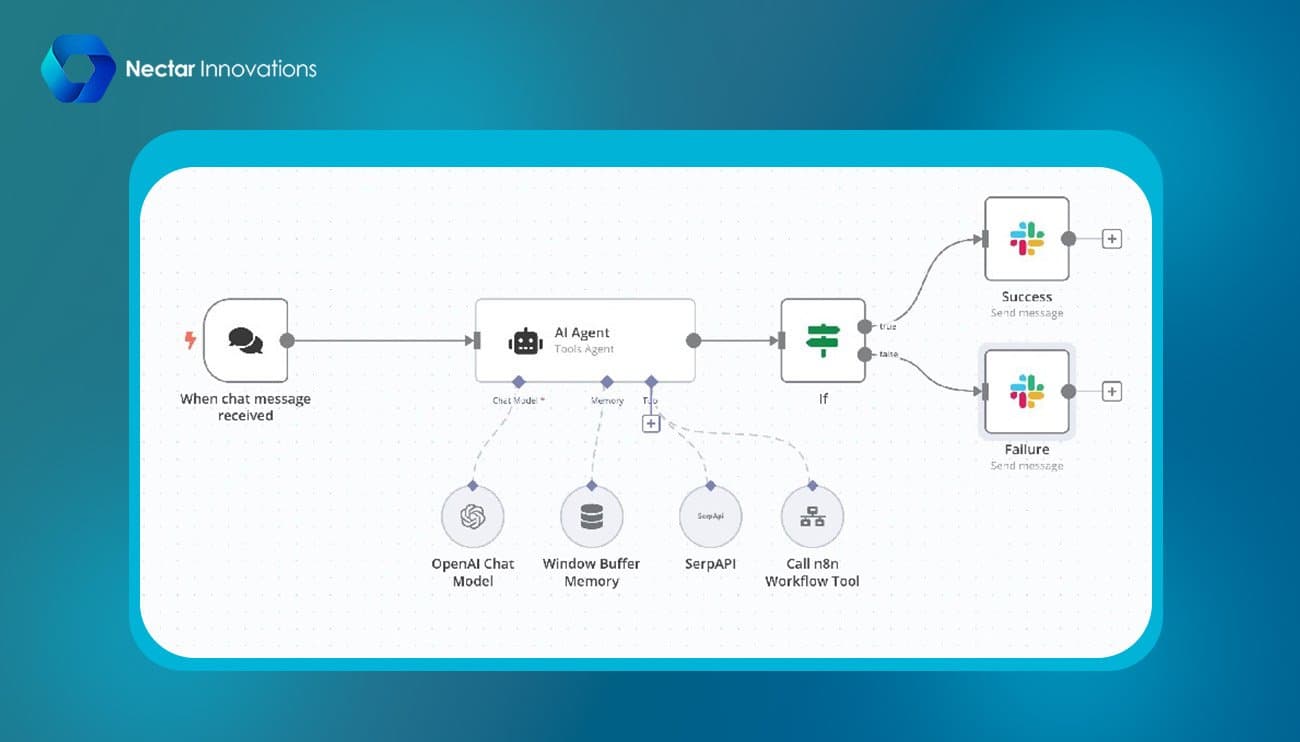
Let's set up a no-code platform to power your AI agent after you pick your hosting environment. This vital step will turn your hosting space into a functional workspace. You can build sophisticated AI agents without writing any code.
- Installing n8n or similar tools
N8n stands out as one of the leading no-code workflow automation platforms to build AI agents in 2026. This open-source tool gives you a visual, node-based environment. You can connect services like LLMs, APIs, and databases by arranging nodes in a workflow.
Here's how to install n8n on your chosen environment:
- Access your server via SSH or terminal
- Install Node.js (v14 or higher) if not already present
- Run npm install n8n -g to install n8n globally
- Launch with n8n start to begin the setup process
The n8n dashboard appears after launch. You can create new workflows here. Each workflow node represents a single task. This lets you build complex automation one step at a time.
Selecting the Right Trigger
Your AI agent needs a trigger to activate. You can choose from:
- HTTP requests (API endpoints)
- Scheduled intervals
- Chat message events
- Database changes
- External service webhooks
New developers should start with the chat message trigger. It's accessible and activates your workflow when users send messages.
- Using Docker for easy deployment
Docker plays a vital role in AI agent development through containerization. The Node-RED Docker image alone has over 100 million downloads. More developers keep choosing Docker to deploy their no-code tools.
Docker brings these advantages to AI agent deployment:
- Environment isolation: Your code runs the same way everywhere
- Dependency management: Isolated containers prevent version conflicts
- Portability: Your application moves across platforms with ease
- Scalability: Container scaling adapts to workload changes
Deploy n8n with Docker using this command:
docker run -it -p 1880:1880 -v n8n_data:/data --name myn8n n8n/n8n
This creates a Docker container with n8n and mounts a volume for your workflows. Docker Compose makes deployment even simpler by managing multiple containers through one configuration file.
Docker's ecosystem supports complex AI agents with these tools:
- Docker Model Runner: Turns LLMs into OCI-compliant containers
- Docker Offload: Enables remote access to Docker engines with GPUs
- MCP Gateway: Works as a unified control plane for multiple MCP servers
- Connecting to open-source LLMs
The intelligence core of your AI agent comes from connecting to Large Language Models after setting up your no-code platform. Most platforms now directly integrate with open-source LLMs through their node libraries.
Add an AI node from the right-side panel in n8n to connect your agent to language models. The platform connects to popular open-source models. You'll need to:
- Select your preferred model
- Configure API connection details
- Create appropriate prompts
- Test responses with sample inputs
Docker's AI features make LLM integration smoother. The Model Runner helps package and share AI models for better portability and deployment.
Docker Hub now gives you access to popular models, orchestration tools, and MCP servers. This makes building AI agents with open-source LLMs easier. You get the best of visual workflows from no-code platforms and Docker's containerization.
Test your LLM connections regularly with sample data. This ensures accurate responses before you move on to complex workflow development.
Step 3: Build Your First AI Agent
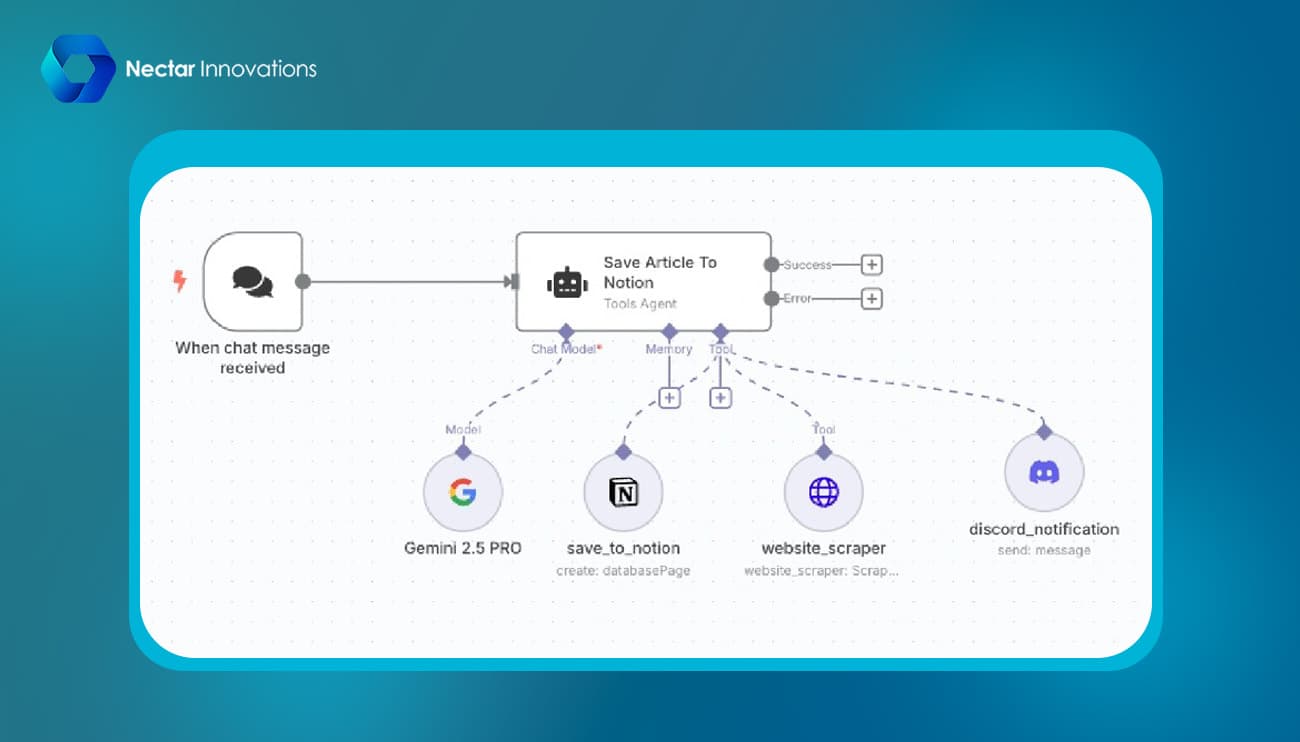
Your no-code trip comes alive the moment you build your first AI agent. The time has come to create the intelligence that will automate tasks now that you have installed your platform.
- Creating workflows with drag-and-drop tools
The visual canvas shapes your AI agent. Modern platforms like AgentKit provide easy-to-use drag-and-drop interfaces that make complex workflow creation simple. Here's how to build your first workflow:
- Start with a trigger node that activates your agent (chat message, form submission, or scheduled event)
- Add processing nodes that define your agent's thinking
- Connect action nodes that perform specific tasks
- Create output nodes that deliver results back to users
Drag-and-drop tools make agent creation much simpler. One engineer said, "I rebuilt my entire n8n workflow inside MindStudio in 5 minutes". These visual builders remove the need for manual JSON editing and let you test live in the same window, which speeds up development.
Most platforms offer templates to get you started. You can describe the agent you want to build, and tools like MindStudio Agent Architect will create the support structure. You can then improve your agent by describing the changes you want without writing code.
- Integrating APIs and external tools
An AI agent shows its true power by connecting with other services. API integration helps create agents that perform real-life tasks beyond conversation.
APIs allow your agent to:
- Pull data from your existing business tools
- Update records in external systems
- Process information through specialized services
- Trigger actions in connected applications
The best way to handle API integration is to treat each API as a tool for your agent. Modern platforms handle complex authentication tasks and offer options for API keys, Bearer tokens, Basic Auth, OAuth 2.0, and custom authorization.
APIs need specific request parameters, but many platforms now offer no-code integration builders that make this process easier. These tools remove technical barriers and let you connect your AI agent to any data source without programming skills.
- Adding memory and state management
An AI agent needs memory to be more than a stateless chatbot. Adding persistence turns your creation into a genuine digital assistant that keeps track of context in conversations.
Memory implementation usually uses SQLite or similar lightweight databases to store:
- Agent information (persona, instructions, strategy)
- Multiple states for each agent
- Timestamps for auditing and cleanup
State-based memory helps AI agents encode user knowledge as structured fields with clear precedence. Your agent can maintain meaningful conversations even when they span days or weeks.
To implement memory in your no-code agent:
- Decide what counts as meaningful, durable memory
- Create clear rules for conflict resolution between memories
- Regularly remove stale or redundant information
- Find the right balance between accuracy, cost, and latency
A well-configured memory system lets your AI agent pause workflows while waiting for human approval and continue naturally once it receives input. This creates truly interruptible workflows that maintain their state across sessions.
Step 4: Test, Debug, and Improve
Testing makes a big difference between a simple chatbot and a reliable AI agent. After building your agent, a full assessment becomes vital to make sure it works consistently and safely in real-life scenarios.
- Running test cases and fixing errors
Your agent needs reliable assessment datasets with at least 30 test cases. These should include:
- Success scenarios (expected behaviors)
- Edge cases (unusual but valid inputs)
- Failure scenarios (invalid inputs)
A complete testing approach needs to assess your agent on multiple fronts at once:
- Accuracy of outcomes
- Quality of reasoning
- Tool usage success
- Adaptability to variations
End-to-end testing plays a vital role with AI agents. Testing the entire system works better than checking components separately to spot integration problems. On top of that, it helps to check trace logs regularly. This way you can spot your agent's reasoning loop, decisions, and tool usage patterns to catch weird behaviors early.
Many platforms now give you special debugging tools that make this process easier. Automated diagnostics help you spot performance issues, logic errors, or data problems quickly. These tools let you compare models side by side to find which one gives the best accuracy, price, speed, or response quality for what you need.
- Using reflection loops for better output
Reflection loops help simple agents keep getting better. This process follows a clear pattern:
- Your agent creates its original output
- An evaluator checks the result using specific criteria
- The agent improves its output based on feedback
- The process continues until quality meets standards
This feedback system works like how people learn through practice and correction. Each round improves performance as the agent builds on what it learned before.
You can add reflection by including self-reflection prompts that ask "Is the response accurate?" or "Is there a better approach?". The agent then looks at its work again, spots problems, and makes improvements through several rounds.
- Adding safety checks and timeouts
Reliable AI agents need built-in protection. Start by adding timeouts to stop endless execution loops. Controls should automatically stop long-running workflows that go past set limits. This stops unexpected processes from using up resources.
Timeouts work best at different levels:
- Agent session level (total execution time)
- Function call level (individual operations)
- User input waiting periods
On top of that, circuit breakers stop repeated failed requests to external APIs. They automatically stop trying after several failures, which prevents errors from spreading through your system.
Keep human oversight for important decisions when confidence scores run low. This human-in-the-loop approach stops your agent from making expensive mistakes in uncertain situations.
Track your agent's health scores and regression metrics, and only deploy new versions after they pass specific standards. This makes sure each update actually makes things better instead of worse.
Step 5: Deploy and Monitor Your Agent
Your AI agent transforms from a development project to a working digital assistant when you deploy it. After full testing, it's time to bring your agent to the ground.
- Going live with your AI agent
Large enterprise-wide rollouts should wait. Your best approach is targeted deployments to specific teams who provide meaningful feedback. Before full deployment:
- Set up test environments that mirror production without exposing sensitive data
- Confirm outputs against known-correct answers
- Create feedback mechanisms to flag incorrect responses
Successful enterprises deploy AI agents as processes through orchestration platforms and automatically inherit lifecycle management and governance.
- Tracking performance and usage
Monitoring becomes crucial to catch issues and performance drift immediately after deployment. These key metrics need tracking:
| Metric Type |
Examples |
Purpose |
| Technical |
Latency, error rates, token usage |
System health |
| Behavioral |
Success rate, intent accuracy |
Performance quality |
| Business |
Time saved, cost efficiency |
ROI measurement |
Unified dashboards powered by monitoring tools enable continuous evaluation. These dashboards detect anomalies instantly and present trends in business-friendly language.
- Scaling your agent for more tasks
Your agent's capabilities should expand only after proving stability. Cloud-based solutions help agents handle higher workloads as organizations grow. Reliable scaling requires you to:
- Apply lessons from pilot deployments to each expansion
- Build smooth data connectivity as your foundation
- Keep human oversight for high-risk decisions
Want expert guidance to scale your AI agent? with our specialists today.
Conclusion
AI agents lead business breakthroughs today. They make workflow automation available to everyone - even those without technical skills. This piece shows you how to build powerful AI agents in 2026, whatever your coding experience.
The five-step process changes months of complex development into a simple trip. You can choose your hosting environment and set up a no-code platform. Then build workflows visually, test well and deploy with confidence.
No-code tools have made AI agent creation possible for everyone. Businesses can now automate complex processes and merge with existing systems. They can scale operations quickly too. That's why 82% of organizations want to implement AI agents this year.
Deployment isn't the end of your trip. Your AI agent needs constant monitoring and updates as your needs change. The best approach is to start small with targeted deployments. Keep track of performance metrics and scale up as you confirm results.
Tomorrow's successful organizations will blend human expertise with AI automation. This guide gives you the knowledge to create sophisticated AI agents without coding. You have the chance to change your business operations - just start building.
Key Takeaways
Building AI agents without coding has become accessible to everyone in 2026, democratizing powerful automation capabilities for businesses of all sizes.
- No-code platforms reduce AI development costs by 80% and cut development time to just 15-60 minutes compared to traditional coding approaches that take months.
- Start with VPS hosting ($20-100/month) over local hosting for beginners - it offers instant scalability, lower upfront costs, and managed maintenance options.
- Use visual drag-and-drop tools like n8n with Docker deployment to create sophisticated workflows connecting LLMs, APIs, and external services without programming knowledge.
- Implement memory and state management to transform basic chatbots into intelligent agents that maintain context across conversations and can pause/resume workflows.
- Deploy gradually with targeted rollouts and continuous monitoring - track technical metrics (latency, error rates), behavioral metrics (success rates), and business metrics (ROI) for optimal performance.
The shift from traditional development to no-code AI agent creation represents a fundamental change in how businesses can leverage artificial intelligence. With proper testing, safety checks, and monitoring in place, organizations can now build enterprise-grade AI agents that automate complex processes and integrate seamlessly with existing business tools.



 by
by